
DevOps vs DevSecOps: What Changes When Security Joins the Pipeline
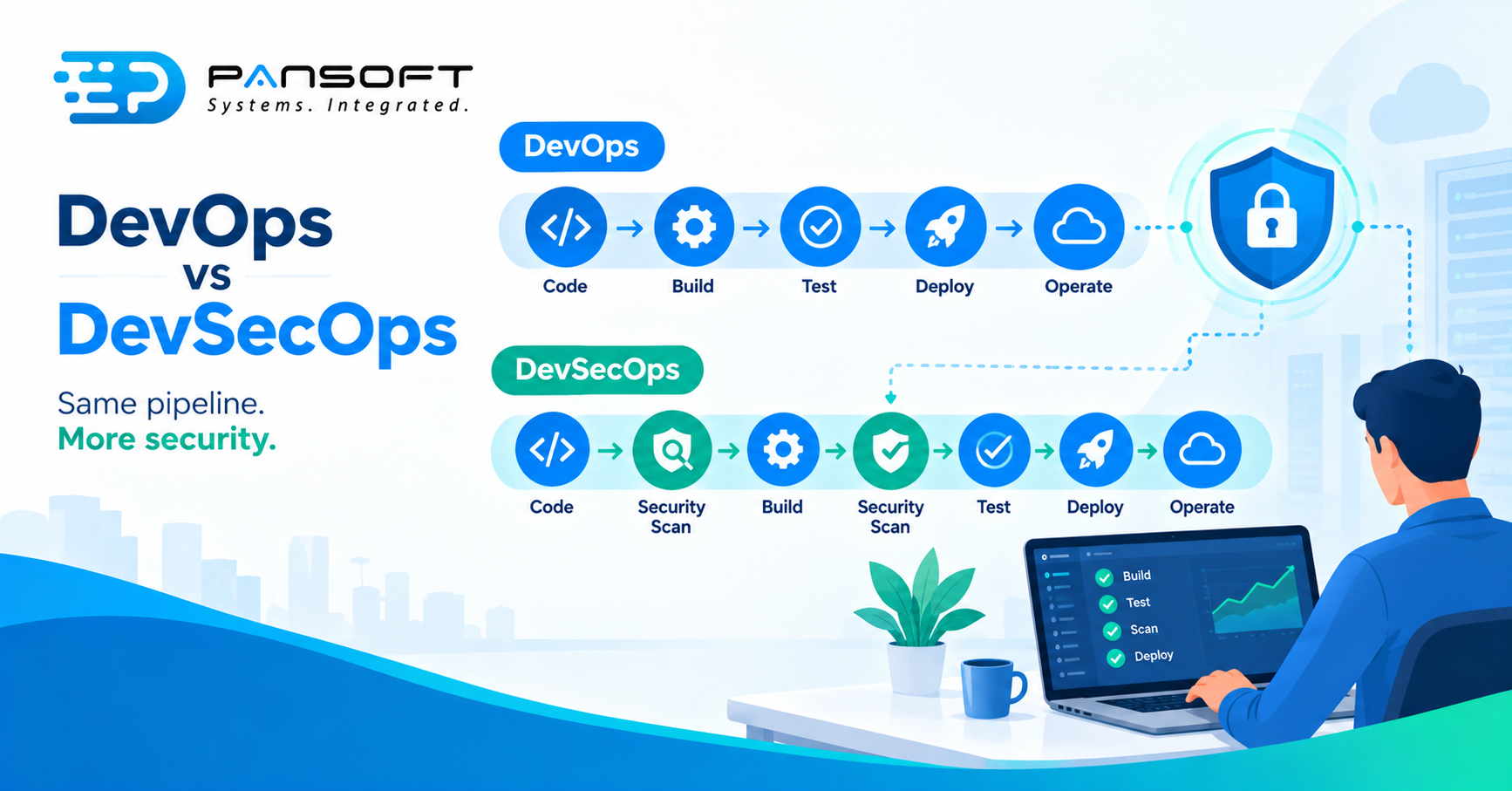
DevOps automates how software is built and released. DevSecOps services Australia wide add security checks to that same automation, so problems surface as code is written, not after release. The pipeline stays. What changes is who checks what, and when.
This is for IT managers and owners who already run, or are planning, automated releases and want to know what adding security actually involves. Pansoft’s DevOps page covers the wider service.
What’s the difference between DevOps and DevSecOps?
DevOps joins development and operations around automated delivery. DevSecOps adds security to that same loop, from the first change to the running system. The US National Cybersecurity Center of Excellence (NCCoE) describes it as integrating security as a fundamental component of DevOps.
| DevOps on its own | With DevSecOps | |
|---|---|---|
| When security happens | Often a review near the end | Checks built into the pipeline from the start |
| Who sees a finding | Frequently a separate team, later | The developer, while the change is fresh |
| What the pipeline does | Builds, tests, deploys | Builds, tests, scans, then deploys |
| What it protects | The application | The application, its dependencies and the pipeline itself |
| Main cost | Manual steps and slow releases | Findings to triage and checks to maintain |
Choose DevOps on its own while you’re still automating basic releases and handle little sensitive data. Add the security layer once a pipeline exists, or sooner if customers, contracts or regulators ask how your software is checked.
What actually changes in the pipeline?
New checks run automatically on every change, and somebody owns what they find. Pansoft’s DevOps page lists static and dynamic application testing (SAST and DAST), container and infrastructure scanning, dependency and secret management, compliance validation and policy as code.
The NCCoE names the awkward parts of this work: managing third-party and open-source components, handling code signing and keys, and producing evidence of what’s inside your software and where it came from. You can’t fix a component you don’t know you’re using.
Here’s a cost people skip. Switch a scanner on across an old codebase and expect a long list on day one. A sensible start is to hold new changes to the standard and work the backlog separately.
Done properly, CI/CD pipeline implementation puts each check where it’s quick enough that developers don’t route around it. Pansoft’s CI/CD page covers the pipeline side.
Who protects the pipeline itself?
You do, and it’s the part most teams forget. OWASP says CI/CD systems carry code from an engineer’s workstation to production, and that attackers are moving towards them because they’re an efficient path to an organisation’s most valuable assets.
OWASP’s Top 10 CI/CD Security Risks includes inadequate identity and access management, insufficient credential hygiene, poisoned pipeline execution, improper artifact integrity validation and insufficient logging and visibility. It links the rise in attacks to heavier automation, infrastructure as code and reliance on third-party services. The list dates from 2022, so treat it as a starting point.
In plain terms, ask three things. Who can change the pipeline? Where do its credentials live? Would you notice if it changed?
Does a recognised framework back this up?
Yes, though it’s guidance, not a certificate. NIST’s Secure Software Development Framework (SP 800-218, version 1.1) groups its practices into four: prepare the organisation, protect the software, produce well-secured software and respond to vulnerabilities.
NIST says the practices are outcome-based and meant to be customised, not used as a checklist. That’s a useful lens for DevSecOps practices generally. Pick the outcomes that matter to your business, then build the checks to prove them.
What changes when you run Kubernetes?
The cluster becomes part of what you secure. With container orchestration, access, networking, secrets and workload settings are all configuration, and a mistake there is as real as a bug in the code. Kubernetes’ own documentation carries a baseline security checklist for clusters, with related guidance on role-based access control, network policies, Pod Security Standards and secrets.
Kubernetes deployment services worth paying for cover that configuration as well as getting workloads running, and check it in the pipeline like anything else. Pansoft has a Kubernetes page for that side of the work.
What does it look like in practice?
Picture an 80-person education technology company that releases daily on a Kubernetes cluster. This is a hypothetical, not a client story. A large customer sends a security questionnaire asking how builds are checked and what’s in the software. Without security in the pipeline, the honest answer is “we think so”. With it, the answer is a record: scans on every change, a list of components and a named owner for findings.
That shift from belief to evidence is usually the real deliverable.
What should you ask a provider?
Ask for specifics, not slogans. Searching for DevOps services Australia wide, or CI/CD pipeline consulting Australia wide, returns plenty of names. If you’re not sure where to begin, DevOps consulting is the place to start, before anyone picks tools.
- Which checks run, and where? Name them.
- Who owns findings, and who decides whether one stops a release?
- How is the pipeline itself protected? Access, credentials, logging.
- What’s included for Kubernetes, if you use it?
- What will we see in the first few weeks?
Quick questions
Do we need DevOps before DevSecOps?
Mostly, yes. DevSecOps adds checks to an automated pipeline, so there has to be a pipeline first. If your releases are still manual, start by writing the steps down and automating them. You can plan the security checks alongside, but they need somewhere to run.
Does DevSecOps slow releases down?
It can, a little, because every check takes time and findings need a decision. The trade is catching problems while they’re easier to fix. Keep checks fast by running the heavy ones on a schedule, and agree in advance which findings stop a release.
Is a DevSecOps tool the same as DevSecOps?
No. Tools run the checks, but DevSecOps is the habit of acting on what they find. A scanner without named owners for its findings just produces a longer to-do list. Agree who fixes what, and by when, before switching anything on.
Want to talk it through?
If you’re unsure what security should look like in your pipeline, there’s no pressure. Pansoft can look at how you release today and where checks would fit. You can get in touch whenever suits you.

Related Posts

Enterprise SD-WAN Platform Australia Buyers, Essential Multi-WAN Checks
Enterprise SD-WAN Platform Australia Buyers, Essential Multi-WAN Checks By the Pansoft Technologies team | Published 6 November 2026 | Last reviewed: November 2026 An enterprise…
Read More
What Is Zero-Touch Deployment? Essential Facts for Multi-Site Rollouts
What Is Zero-Touch Deployment? Essential Facts for Multi-Site Rollouts By the Pansoft Technologies team | Published 6 November 2026 | Last reviewed: November 2026 Zero-touch…
Read More