
Managed EDR and EPP Services for Business: What’s the Difference?
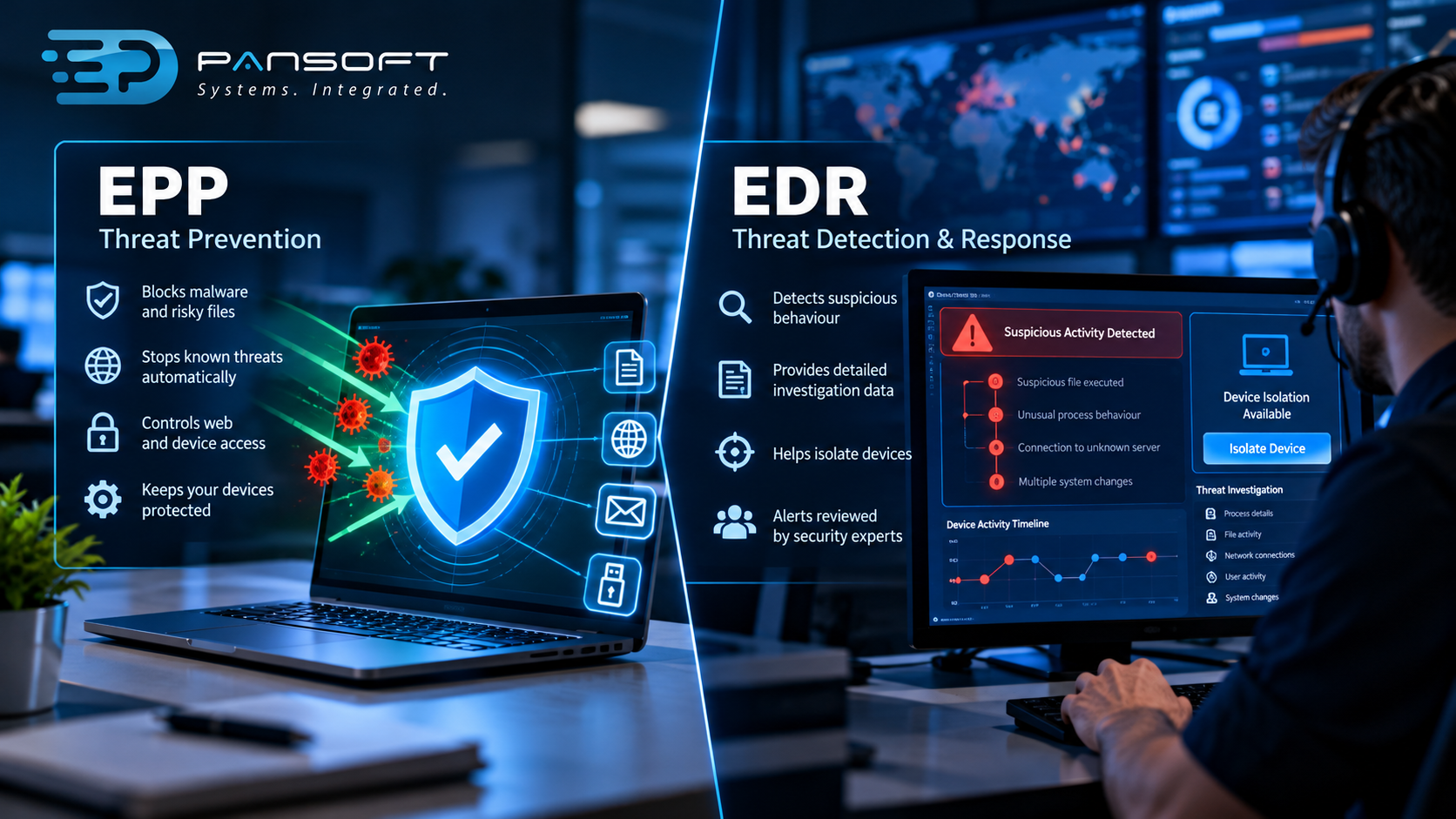
EPP tries to stop known threats before they run on a device. EDR records what devices do, spots suspicious behaviour that slipped through and helps you respond. Most businesses need both, and the managed part means someone actually watches the alerts.
What does an EPP actually do?
An Endpoint Protection Platform (EPP) is the first line of defence on your laptops, desktops and servers. It blocks known malware, risky files and obvious bad behaviour automatically, usually without anyone lifting a finger.
Think of it as antivirus that grew up. Depending on the product, it might also filter web traffic, control USB devices and block programs behaving oddly. Cheap, fast and quiet. That’s its charm.
The limit is in the name. It’s built to stop what it recognises, or what looks like something it recognises. A brand new threat can walk straight past. So can a legitimate admin tool in the wrong hands, and so can a staff member who types their password into a convincing fake login page.
What does that mean for your business? An EPP alone handles the everyday junk well. It won’t tell you much when something clever gets in, because it was never meant to.
What does EDR add on top?
Endpoint Detection and Response (EDR) keeps a running record of what happens on each device and looks for suspicious behaviour that got past prevention. It also gives someone the tools to investigate and contain a problem, like isolating a laptop from the network.
Prevention isn’t perfect, so you want a second layer that assumes something will get through eventually.
Here’s a practical example. Say a staff member opens a dodgy attachment. The EPP doesn’t flag it. Twenty minutes later, that laptop starts running admin commands it’s never run before and reaching out to an unfamiliar server. EDR notices the pattern and shows the chain: which email, which file, what it touched. Without it, you’d be guessing.
The catch is that EDR produces alerts, and alerts need a human. Plenty of businesses buy the tool, then discover nobody has time to read what it says. Sorted out on paper, ignored in practice.
How do the two compare side by side?
EPP prevents, EDR detects and responds. They overlap in places, and many products now bundle both, so the labels blur. The table below shows the general split, though specific products vary.
| EPP | EDR | |
|---|---|---|
| Main job | Block threats before they run | Spot and investigate what got through |
| Known malware | Strong | Not the focus |
| Unusual behaviour | Limited | Strong |
| Investigation detail | Minimal | Detailed device history |
| Isolate a device | Sometimes | Usually |
| Needs people to review alerts | Rarely | Yes |
If a vendor tells you their platform does all of it, fine, ask which parts are included in your licence and who handles the alerts. Those are two very different questions.
Why does the “managed” part matter?
Managed means a security team watches your endpoint alerts, decides which ones are real and tells you what to do. Without that, EDR is a firehose of data pointed at an IT team with a full day job already.
Picture a Friday night. Your IT person finished at 5pm. An alert fires at 11. Who sees it?
That gap is what managed EDR and EPP services for business are built to close. The tools stay the same, but there’s a person on the other end who knows what normal looks like for your environment and can say “that’s a real one, here’s what to do.” The threat detection and response side of the job is mostly human judgement, and software can’t supply it.
Check where the provider’s responsibility stops. Can they isolate a device themselves, or do they phone you first? Both arrangements can work, but you need to know which one you’ve signed up for. It’s a nasty surprise at midnight.
If you also want monitoring across servers, cloud accounts and network gear, not just devices, that’s wider than endpoints and sits in managed SOC territory. You can see how Pansoft approaches the device side on the endpoint protection page.
Do you need both, or is one enough?
Most businesses with staff on laptops and cloud apps should want both prevention and detection. A very small team with simple systems and no compliance pressure can sometimes start with a good EPP and add detection later.
Some gut-checks to help decide:
- Do you hold sensitive customer or financial data? Lean towards both.
- Do you have remote staff? More devices outside your office network means more reason for detection.
- Does anyone review security alerts today? If not, managed is the sensible route.
- Is your IT team two people wearing six hats? Then a tool they have to babysit is a headache, not a safeguard.
- Do contracts or tenders ask for evidence of endpoint monitoring? That pushes the answer firmly towards both.
If you’re comparing endpoint protection services Australia wide, the pitches will all sound alike. Ignore the brand names for a minute and ask what happens at 2am, who does it and what you can see afterwards.
Compliance deserves a straight word. Cyber security compliance Australia depends on your industry and your contracts, and the details change, so check what actually applies to you rather than assuming. Essential Eight alignment is a related point. The Essential Eight is a set of mitigation strategies from the Australian Cyber Security Centre, not a product. Endpoint tools support the work and help show your controls are doing their job, but buying one doesn’t tick the boxes on its own.
Not sure where you stand? A security assessment will tell you faster than guessing, and it’s cheaper than buying the wrong thing.
What mistakes do businesses make with endpoint security?
The big ones are assuming antivirus is enough, buying EDR nobody watches, and leaving some devices uncovered. All three are common, and all three are fixable.
- Treating antivirus as the whole answer. It’s a start, not the lot.
- Buying detection with no one on the other end. The alerts pile up and, in time, get ignored.
- Missing devices. Contractor laptops, an old server nobody remembers, a director’s personal tablet. Attackers love the forgotten machine.
- Running two protection products at once. They can fight each other and slow devices down. Pick one approach and stick to it.
- No plan for what happens next. Detecting a problem is only half the job. Incident response planning, meaning who gets called, who can isolate a device and when customers are told, needs to exist before the alert, not during it.
None of it is dramatic. Most of it is housekeeping that never got scheduled.
Endpoint security is one layer in a bigger picture, and the rest of that picture sits under cyber security.
Quick questions
Is EDR just a better version of antivirus?
Not quite. Antivirus and EPP aim to block threats upfront. EDR assumes some will get through and focuses on spotting and investigating them. They do different jobs, which is why they work best together.
Can we run EDR ourselves instead of using a managed service?
Yes, if you have people with the time and skills to review alerts and respond, including out of hours. If you don’t, the tool will still run, but the alerts may sit unread.
Will EDR slow our devices down?
Modern agents are generally designed to run lightly in the background, but performance varies between products and device types. A trial on a handful of machines is the sensible way to check before a full rollout.
Want to talk it through?
If you’re weighing this up, no pressure at all. Pansoft can walk through what you’ve got now, where the gaps are and whether prevention, detection or both makes sense for your business. You can get in touch whenever suits you.

Related Posts

Enterprise SD-WAN Platform Australia Buyers, Essential Multi-WAN Checks
Enterprise SD-WAN Platform Australia Buyers, Essential Multi-WAN Checks By the Pansoft Technologies team | Published 6 November 2026 | Last reviewed: November 2026 An enterprise…
Read More
What Is Zero-Touch Deployment? Essential Facts for Multi-Site Rollouts
What Is Zero-Touch Deployment? Essential Facts for Multi-Site Rollouts By the Pansoft Technologies team | Published 6 November 2026 | Last reviewed: November 2026 Zero-touch…
Read More