
Continuous Integration vs Continuous Deployment: What’s Actually Automated in Each
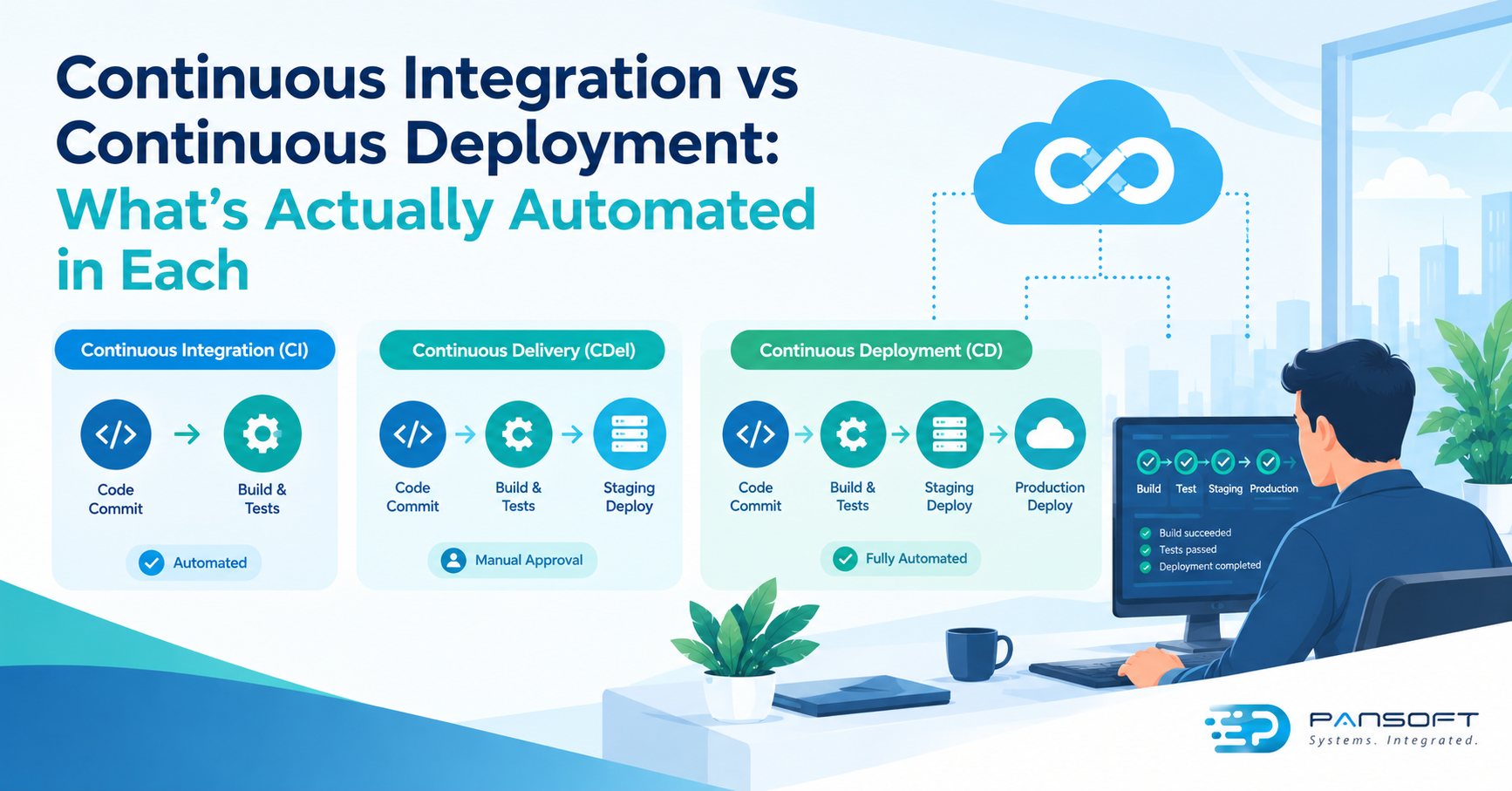
Continuous integration automates building and testing every code change as it’s committed. Continuous deployment goes further and releases each passing change to production with no human approval. The step between them, continuous delivery, stops at a button: someone still decides when customers get it.
This is for IT managers and owners who keep hearing “CI/CD” and want to know which parts run by themselves and where a person still signs off. Pansoft’s CI/CD page covers the service itself.
What’s the difference between continuous integration and continuous deployment?
Continuous integration checks the code. Continuous deployment ships it. The first is about whether a change breaks the build. The second is about whether a passing change goes live without anyone pressing a button.
| Continuous integration | Continuous delivery | Continuous deployment | |
|---|---|---|---|
| What’s automated | Build and tests on every commit | Build, tests and staging for every change | The whole path, through to production |
| Who decides on production | Not covered, it’s a separate release step | A person approves | Nobody, a passing change goes live |
| Question it answers | Does this change break the build? | Is this change ready to release? | Can we release every good change straight away? |
Start with continuous integration, whatever else you do. Choose continuous delivery when a person has to decide the release moment, such as a customer date or a compliance sign-off. Choose continuous deployment when your tests are trusted enough that approval adds delay without adding safety.
What does continuous integration actually automate?
The build and the tests, every time someone commits. Martin Fowler’s well-known article describes it as team members integrating their work frequently, usually at least daily, with each integration checked by an automated build that includes tests.
Build automation is the base of it. Fowler says the build should run with a single command, and be self-testing, so a failing test fails the build. The build is then run on a shared machine after each commit, and whoever broke it fixes it straight away. He suggests aiming for around ten minutes, with slower tests in a later stage.
Notice what’s missing. Nothing here says anything is released. Integration tells you the code is sound, and that’s all.
Where does continuous delivery fit in?
In the middle, and it’s the term people mix up most. AWS describes continuous delivery as code changes being automatically prepared for release: every committed change is built, tested and pushed to a non-production environment such as staging.
The release to production is still a human decision. AWS draws the line there, saying continuous delivery includes a manual approval to update production, while continuous deployment does not. AWS’s own guidance adds that if a test fails at any stage, the pipeline stops.
What does continuous deployment add?
Automated deployment all the way to production, with nothing in between. AWS’s guidance describes it as an uninterrupted flow through the whole pipeline, with no explicit approvals.
That’s powerful and unforgiving. If the tests are the only gate between a change and your customers, they need to be good. It’s also not always allowed by your own rules. GitLab, for instance, offers deployment approvals because testing, security or compliance processes sometimes require a sign-off before production. Deployments are blocked until the approvals are given, and by default the person who triggered the pipeline can’t approve their own deployment.
Two details worth knowing. On GitLab, approving a deployment doesn’t start it, so someone still runs the deployment job afterwards. And the approvals feature needs the Premium or Ultimate tier, as at October 2026. Check what your platform tier actually includes before you plan a gate around it.
How do you decide which one you need?
Ask how much you trust your tests and how easily you can undo a release. continuousdelivery.com suggests separating deploying code from releasing a feature, using blue-green deployment or feature toggles, which makes the answer to the second question friendlier.
Picture a 30-person ticketing software company. This is a hypothetical, not a client story. Its customer booking app needs a person to choose the release moment around ticket on-sales, so continuous delivery fits. Its internal reporting tool has no such deadline and good tests, so continuous deployment is fine. One company, two approaches.
Before you automate further, a few things should already be true. Environments should match each other, which infrastructure as code helps with. If you run containers, container orchestration is one more target the pipeline deploys to. And the automated gates should check what matters, which is where DevSecOps practices come in.
What should you ask a provider?
Ask who owns the gate. Searching for CI/CD pipeline services Australia wide, or CI/CD pipeline consulting Australia wide, returns plenty of names. For a view of how it all fits together, see Pansoft’s DevOps page, and for help choosing the right level for your team, DevOps consulting is the place to start.
- Where does a human approve, and why there?
- How fast is the first stage? If it’s slow, people will skip it.
- What happens when a deployment fails? Who’s told, and how does it roll back?
- Who owns the pipeline’s credentials and access afterwards?
- Can we start with integration only? A good provider will say yes.
Quick questions
Do we need continuous integration before continuous deployment?
Yes. Continuous deployment relies on a trusted automated build and tests, because they’re the only gate between a change and production. Get the integration habit and the test suite solid first. Deploying faster on weak tests just ships problems faster.
Does continuous deployment mean no human is involved?
Not in the whole process. People still write the code, review changes, design the tests and respond to alerts. What’s removed is the manual approval before production. If you need a sign-off for compliance, keep a gate, which tools such as GitLab support.
Can different applications use different approaches?
Yes, and often should. A customer-facing payments system and an internal reporting tool carry different risk. Choose per application, based on how much you trust its tests and how easily you can undo a release. Consistent pipeline tooling still helps either way.
Want to talk it through?
If you’re unsure how much of your release process should run itself, there’s no pressure. Pansoft can look at how you release today and where a person should still decide. You can get in touch whenever suits you.

Related Posts

Enterprise SD-WAN Platform Australia Buyers, Essential Multi-WAN Checks
Enterprise SD-WAN Platform Australia Buyers, Essential Multi-WAN Checks By the Pansoft Technologies team | Published 6 November 2026 | Last reviewed: November 2026 An enterprise…
Read More
What Is Zero-Touch Deployment? Essential Facts for Multi-Site Rollouts
What Is Zero-Touch Deployment? Essential Facts for Multi-Site Rollouts By the Pansoft Technologies team | Published 6 November 2026 | Last reviewed: November 2026 Zero-touch…
Read More