
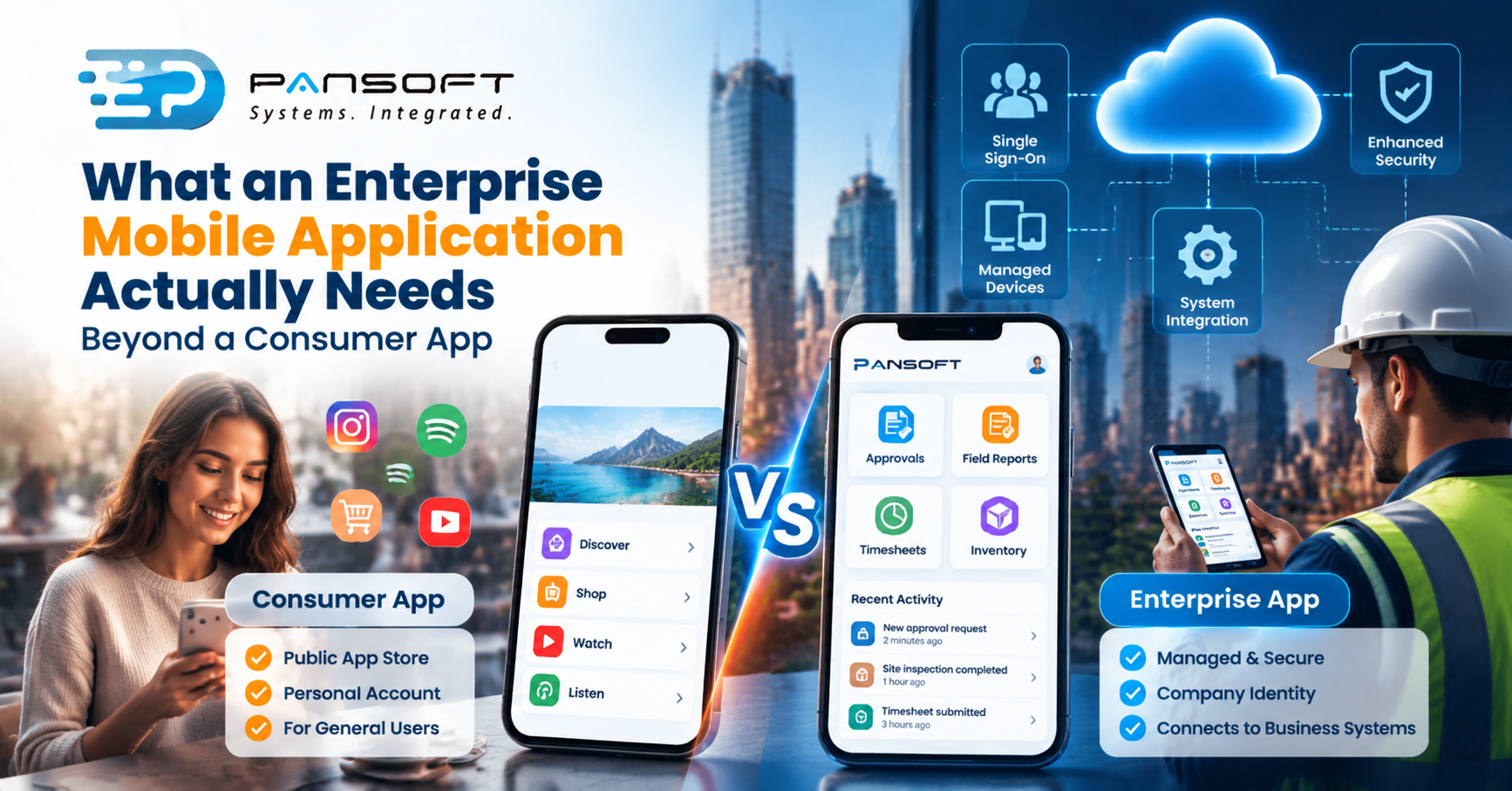
What an Enterprise Mobile Application Actually Needs Beyond a Consumer App
Enterprise mobile applications need what consumer apps skip: managed devices, single sign-on, security testing, links into your internal systems and a plan for support. The app itself is the easy part. What surrounds it decides whether staff use it safely.
This is for owners and IT managers planning an app for staff, partners or field teams, who want the list of things beyond screens and buttons.
What makes a mobile app “enterprise”?
The people using it work for you, the data in it belongs to the business, and somebody has to answer for both. A consumer app can leave those questions open. An enterprise app can’t.
NIST’s guidance on managing mobile device security in the enterprise (May 2023) makes the point that phones began as personal gadgets and became permanent fixtures in organisations, reaching networks and handling sensitive data. It covers company-issued and personally owned devices alike, and treats the whole device lifecycle as part of the job, from deployment through to disposal.
For you, that means the app is one part of a bigger system. Who owns the device, who can switch off access when someone leaves, and where the data lives are all design questions.
How do consumer and enterprise apps differ?
Mostly in everything that happens around the app. The screens might look similar, but who installs it, who signs in and who supports it are very different.
| Consumer app | Enterprise mobile app | |
|---|---|---|
| How it’s installed | Public app store, user’s choice | Often pushed or approved by IT |
| Sign-in | Own account | Company identity, ideally single sign-on |
| Settings | User sets them | IT can set them centrally |
| Work and personal data | One bucket | Kept apart where devices are mixed |
| What it connects to | Its own servers | Your finance, CRM, HR and other systems |
| Who supports it | The developer’s help page | Your IT team, and your provider |
Choose a consumer-style approach for something customers download freely. Treat it as an enterprise app the moment staff use it to do their jobs.
How do staff devices get managed?
Through the platforms’ own business features, which a good app is built to work with. You don’t have to invent device management, but your app should cooperate with it.
Google’s Android Enterprise guidance describes a work profile that separates work apps and data from personal ones, managed configurations that let IT set custom settings for an app, single sign-on across apps, and dedicated devices that can run in kiosk mode.
Apple’s deployment guidance covers device management services, managed apps, and several ways to hand apps to employees, including custom apps, unlisted apps and proprietary in-house apps. It also covers connecting with identity systems such as Microsoft Entra ID.
Ask your provider which of those features your app will support from day one. Retrofitting them is slower and dearer than designing for them.
What does security look like beyond a login screen?
It covers how the app stores data, handles encryption, signs people in, talks to servers and resists tampering. A login screen is the visible bit. Most of the work happens underneath.
The OWASP Mobile Application Security Verification Standard (MASVS) lists 24 controls across eight groups: storage, cryptography, authentication, network communication, platform interaction, code quality, resilience against reverse engineering and privacy. The page doesn’t state a version or date, so check the project for updates. Used as a testing checklist, it gives you something concrete to ask a provider about.
NIST’s guidance pairs the threats of mobile use with mitigations, and links a separate mobile threat catalogue. Neither document is a certificate. They’re references for deciding what to test, then testing it.
How does the app connect to what you already run?
Through interfaces to your existing systems, and that’s usually where the real effort sits. An app that can’t read or write your data is a pretty demo.
Picture a 120-person engineering consultancy that wants an approvals and timesheet app for staff on the move. This is a hypothetical, not a client story. The app is simple. The hard part is that approvals live in an older internal system with no proper interface.
Legacy system integration builds that interface so the app can work safely with the old system. Enterprise application modernisation can then replace the old pieces in stages, without making staff wait for a big switch-over.
If staff also need a browser version, or an admin screen for managers, that’s web development work sitting alongside the app. For the wider system, including back ends and data, see Pansoft’s software development page.
Which build approach suits an enterprise app?
It depends on your devices. If everyone has iPhones, iOS app development on its own may do. If staff are on a mix, cross-platform app development builds one codebase for both and avoids doing the work twice.
Either way, check that the approach supports what you need from device management, sign-in and offline use. Some features may still need platform-specific work, so ask which ones before assuming one build covers all of them.
Pansoft’s app development page lists enterprise mobile work, including workforce management, field service, inspection and reporting, and inventory apps, alongside the integration and security work around them.
What should you ask a provider?
Ask how they’d handle the surrounding pieces, not just the screens. Searching for mobile app development Australia wide returns plenty of names, and a local studio doing custom software development Gold Coast businesses can meet in person is one option among them.
- How will the app be distributed to staff? Public store, private listing or through your device management.
- How does sign-in work? Ideally with your existing company identity.
- Which security checks will be run, and can we see the results?
- How will it connect to our systems? Name the systems.
- What will we see after a few weeks? Agile delivery Australia wide should mean something running on a real device early.
- Who supports it after launch? Updates, fixes and who answers the phone.
Quick questions
Does a business app need to go on the public app store?
Not always. Apple’s guidance describes custom, unlisted and in-house options for distributing apps to employees, and Google’s Android Enterprise guidance covers deploying apps on managed devices. Which route suits you depends on your devices and how staff will get the app, so ask early.
Do we need device management for an enterprise app?
Usually, if staff use it for real work. NIST treats managing mobile device security as part of enterprise use, covering company-issued and personally owned devices. Management lets IT set configurations and separate work from personal data. Ask your provider how the app will work with yours.
Should it be a mobile app or a web app?
Choose a mobile app when staff need device features, reliable offline use or push notifications out in the field. Choose a web application when users are mostly at a desk or on varied devices. Many businesses end up with both, sharing the same back end.
Want to talk it through?
If you’re planning an app for staff, there’s no pressure. Pansoft can look at what it needs to do, what it has to connect to and what sits around it. You can get in touch whenever suits you.

Related Posts
ERP Workflow Automation Explained: What Gets Automated First
Start with approvals, invoice matching, and the repetitive data entry your team repeats every day. Those workflows carry the most delay and the most errors, and automating them changes nothing about how the business thinks. ERP Workflow Automation pays off fastest when you automate one proven process at a time, measure the result, and only then move to the next.
Read More
Custom ERP Development vs Standard ERP Software: When Custom Actually Wins
Custom ERP wins when the way you run the business is the reason customers choose you, and a standard package would force you to reshape proven processes to fit the software. For most organisations, a standard ERP with careful configuration is faster to launch, simpler to maintain, and the right call. Custom ERP Development Australia is worth the investment only when your processes are genuinely different, not just familiar.
Read More