
What Is XDR, and Is It Worth It for a Mid-Sized Australian Business?
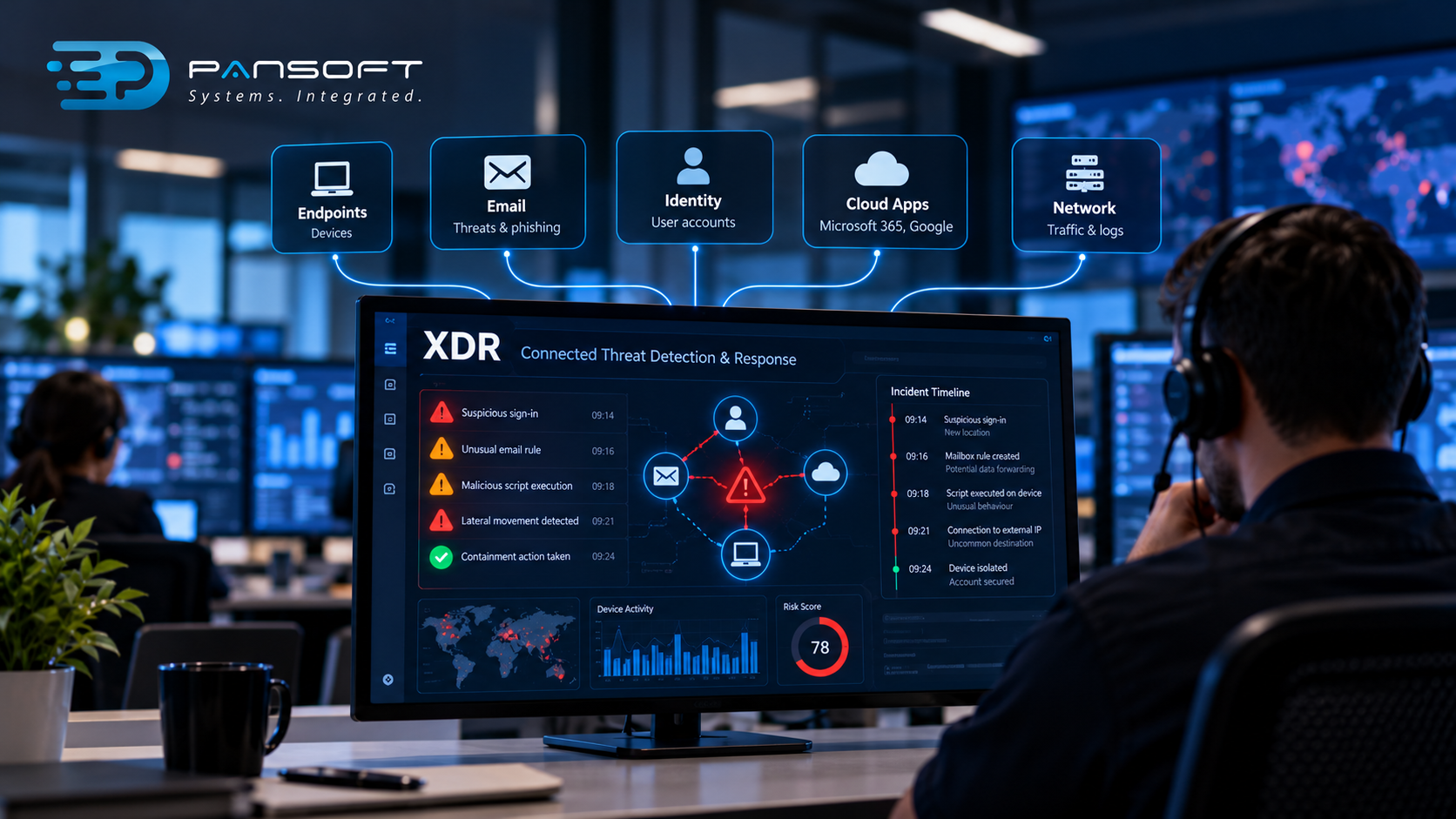
XDR joins up alerts from devices, email, user accounts and cloud apps, so an attack shows as one story instead of five alarms. For a mid-sized business, it’s worth it once you use several of those and have someone to act on it.
What does XDR actually do that my current tools don’t?
Most security tools see one slice. Your endpoint software sees devices, your email filter sees email, your cloud apps log their own sign-ins. Extended Detection and Response (XDR) pulls those signals together and links them.
Why does that matter? Because attackers don’t stay in one slice.
A stolen password gets used to sign in to a cloud app. From there, a rule quietly forwards mail somewhere strange. Later, a laptop runs a script it’s never run before. Three tools, three small alerts, each easy to dismiss on its own. Put side by side, they’re obviously the same incident.
That’s the pitch. Fewer disconnected alerts, more context, faster answers to “what happened and how far did it go?”
What does that mean for your business? If your risk lives in more than one place, and for most mid-sized firms it does, joined-up visibility saves real time during an incident. If your whole setup is a dozen desktops in one office, there’s less to join.
How is XDR different from EDR?
EDR watches devices in depth. XDR keeps that device view and adds other sources alongside it. Think of XDR as a wider lens, not a replacement.
Endpoint Detection and Response (EDR) records what happens on laptops and servers and lets you investigate and contain a problem on a machine. It’s the foundation most XDR products build on.
| EDR | XDR | |
|---|---|---|
| What it sees | Devices | Devices plus email, identity, cloud and sometimes network |
| Strength | Deep detail on a single machine | Connecting events across systems |
| Typical gap | Can’t see a stolen password used in a cloud app | Depends on which sources you’ve actually connected |
| Alert volume | Per device | Fewer, grouped alerts, in theory |
| Skills to run it | Analyst time | Analyst time, plus wider tool knowledge |
Notice the “in theory” and the “depends”. XDR is a label vendors use loosely. One product might connect six data sources, another only two and a bit of marketing. Ask which sources are actually included in your licence, not which ones appear on the brochure.
What does it look like in a real attack?
Picture a hypothetical. A finance officer clicks a convincing fake sign-in page. The attacker now has a valid password and uses it from an unusual location.
Without joined-up detection, the first sign might be a supplier asking why they got an odd payment-detail email. By then the attacker has been inside for days.
With XDR, the strange sign-in, the new mailbox rule and the first unusual action on the finance laptop can be tied together early. An analyst sees one incident, with a timeline, and can reset the account and isolate the device in one sitting.
Early is the point. XDR doesn’t stop the click. It shortens the gap between the click and someone noticing, and that gap is usually where the damage happens.
Is XDR worth it for a mid-sized business?
Often yes, if you’ve got cloud apps, remote staff and a team that can act on alerts. It’s harder to justify if your setup is simple or nobody has time to read what it produces.
Some gut-checks:
- Staff sign in to Microsoft 365 or Google from everywhere. Strong case for it.
- You’ve got a mix of office, home and travelling devices. Same.
- Two-person IT team. The tool alone won’t help. You’d want it managed.
- Mostly one office, few cloud apps. Solid endpoint protection may do the job for now.
- A contract, insurer or tender asks for evidence of monitoring. That tips it towards yes.
Compliance needs a straight word. Cyber security compliance Australia depends on your industry and your contracts, and the details change, so check what actually applies instead of assuming a product covers it. Essential Eight alignment follows the same logic. The Essential Eight is a set of mitigation strategies from the Australian Cyber Security Centre, not something you buy. Patching, multi-factor authentication and backups sit on that list, and XDR doesn’t replace any of them. What it can do is help show those controls are holding.
Not sure where you land? A security assessment will tell you more than a sales call, and it’s cheaper than buying the wrong thing.
Who actually watches it?
Somebody has to. XDR makes alerts better, but it doesn’t make them disappear, and a smarter alert nobody reads is still a silent failure.
This is the part mid-sized businesses most often underestimate. The tool might be excellent. The question is what happens at 11pm on a Friday.
That’s the gap managed endpoint security is built to cover. A team watches the alerts, decides which are real, and tells you what to do or acts on your behalf, depending on the agreement. It’s the people side of threat detection and response, and software can’t supply it.
If you’re comparing providers offering endpoint protection services Australia wide, the pitches will blur together. Strip out the brand names and ask three things. Who looks at an alert after hours? Can they isolate a device themselves, or do they phone you first? What do you see afterwards? You can read how Pansoft approaches this on the endpoint protection page.
When is XDR the wrong buy?
It’s the wrong buy when the basics are shaky. If devices are unpatched, staff have no multi-factor authentication and backups have never been tested, fix those first. Detection on top of a leaky setup gives you a detailed record of the leak.
It’s also the wrong buy when you can’t connect enough sources. XDR earns its keep from joining things up. Connect only the endpoints and you’ve paid for an EDR with a bigger name.
And it won’t replace a plan. Incident response planning, meaning who gets called, who can shut an account down, when customers are told, needs to exist before the alert. Tools don’t write it for you, and 3am is a lousy time to draft one.
Cost matters too, and it varies a lot between vendors and licence tiers. Get quotes based on your actual environment, not a generic figure.
If you’re still deciding where this fits in the bigger picture, it’s one layer among several, and the rest sits under cyber security.
What should you ask before buying?
Ask what’s connected, who responds and what happens if you leave. Vague answers on any of those are a warning sign.
- Which data sources are included, and what costs extra?
- Who responds after hours, by name or team?
- What can we see ourselves?
- How do you cut false alarms, and how will we know it’s working?
- What happens to our data if we switch providers?
- How does it behave alongside the tools we already run? Two overlapping products can clash.
Quick questions
Is XDR the same as EDR?
No. EDR focuses on devices, while XDR adds sources like email, identity and cloud apps and connects them. Many XDR products are built on an EDR core, so the two overlap.
Can a mid-sized business run XDR without a security team?
Technically yes, but the alerts need someone to read and act on them. Without in-house analysts, a managed service is usually the more realistic route.
Do we need XDR to meet the Essential Eight?
No. The Essential Eight is a set of mitigation strategies, not a product requirement. XDR can support your monitoring and help show controls are working, but it doesn’t replace patching, multi-factor authentication or backups.
Want to talk it through?
If you’re weighing this up, no pressure at all. Pansoft can look at what you run now, where the gaps are and whether XDR, a simpler upgrade or managed monitoring makes the most sense. You can get in touch whenever suits you.
Learn more about SIEM services in Australia.

Related Posts

Enterprise SD-WAN Platform Australia Buyers, Essential Multi-WAN Checks
Enterprise SD-WAN Platform Australia Buyers, Essential Multi-WAN Checks By the Pansoft Technologies team | Published 6 November 2026 | Last reviewed: November 2026 An enterprise…
Read More
What Is Zero-Touch Deployment? Essential Facts for Multi-Site Rollouts
What Is Zero-Touch Deployment? Essential Facts for Multi-Site Rollouts By the Pansoft Technologies team | Published 6 November 2026 | Last reviewed: November 2026 Zero-touch…
Read More